
Kinnly SMS Verification Consent
This page explains how users consent to receive SMS verification messages from Kinnly.
How users opt in
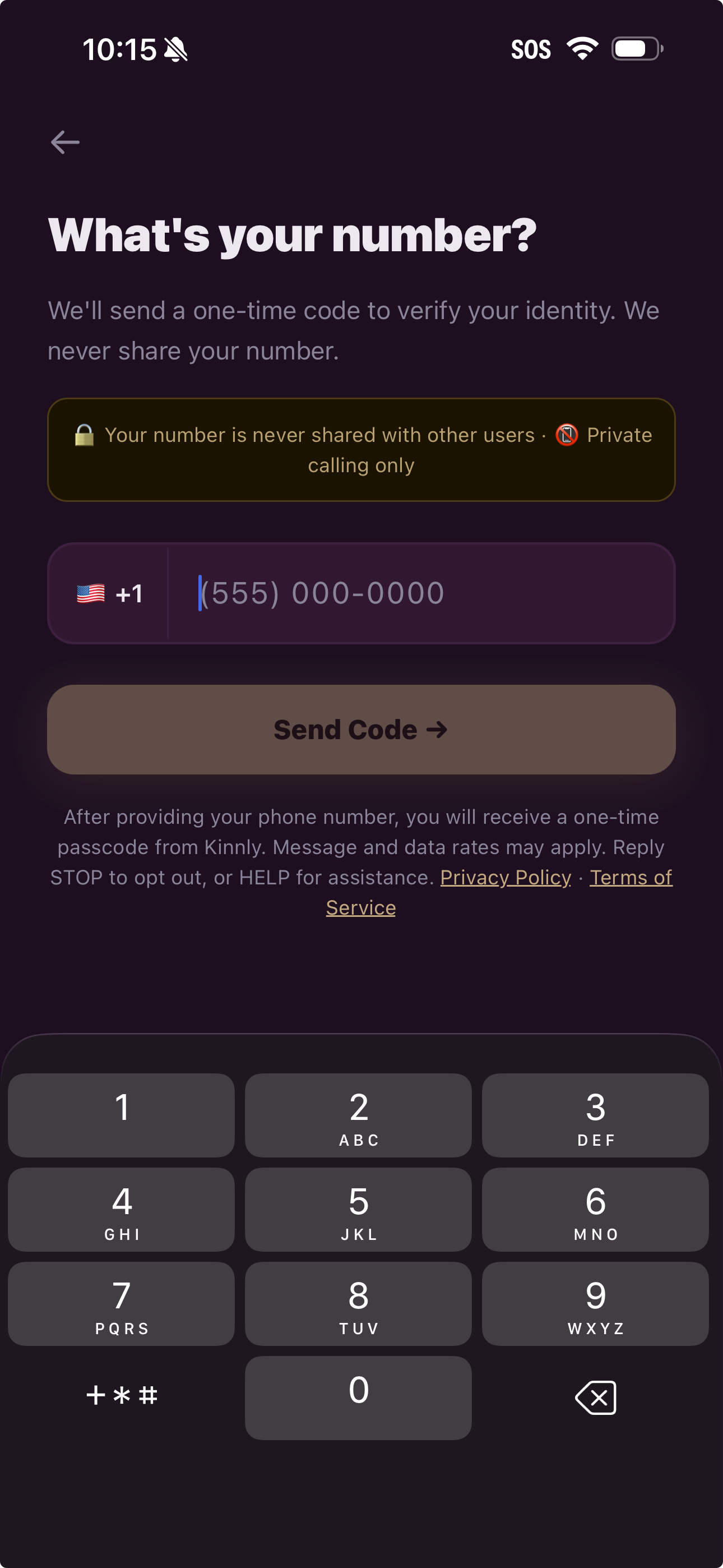
Users opt in by entering their mobile phone number on the Kinnly login screen and tapping "Send Code" to request a one-time verification code.
Consent language shown to users on the login screen:
“After providing your phone number, you will receive a one-time passcode from Kinnly. Message and data rates may apply. Reply STOP to opt out, or HELP for assistance."
Program details
Use case: Transactional authentication / one-time passcode (OTP)
Message frequency: 1 message per login attempt
Message type: Non-marketing, account verification only
Opt-out: Reply STOP
Help: Reply HELP
Sample messages
Your Kinnly verification code is 123456. This code expires in 10 minutes. Do not share it with anyone.
123456 is your Kinnly login code. If you did not request this, please ignore.
Important note
Kinnly does not send marketing or promotional text messages. SMS messages are only sent when a user requests a login verification code.